Thank you for all these details!
But I’m skeptical about seeing it as help for sellers. Indeed, if that’s the case, payments to boost listings will drop, won’t they? And won’t this badge push some professional sellers to only offer favored brands? Whereas richness lies in variety?  But by the way, what does this badge look like and where is it placed? Could we see a photo of it, please? Thank youuu
Hello everyone!
So, I checked with a seller who has the feature to see how items are moving:
- The denim shirt I had on my wishlist last week is no longer there this week, so it seems to move fast and be updated frequently.
- On her profile, an item that wasn’t flagged appeared on demand two days ago, and she actually sold it today.
- I haven’t seen any badges on professional profiles yet.
The badge appears in the same location as the professional badge, top left on the small thumbnails. Clicking on the listing makes the badge disappear, and there’s just a mention « other members are interested » below the photos.
I’m on iPhone iOS 18.1 (latest update, done at the beginning of the week, so the feature is also present on 18). Another Vinted update was released on the App Store, changing the search: there are now input fields at the top instead of having to go through menus each time. The feature is still present after this second update.
Since we can’t see our own profiles, this might not impact paid boost requests, or it might even encourage people to use one to combine an item on demand + boost, or compensate for a lack of items on demand with a paid boost, right?
Latest items seen today on demand: women’s mules (mainly Birkenstock but also flat mules, closed at the front, slightly pointed) black patent babies (both Zara at €10-20 and models at €50 from other brands) some jeans (low-rise flare, various brands, Levi’s and y2k leading) and shorts (mainly Levi’s).
My friend also sees summer items (I don’t see many) and we both have women’s blouses with transparencies, ruffles… a bit dressy.
The game continues!
P.S.: On mobile Safari, in private browsing, no matter how much I click the photo icon, it doesn’t show anything to add a photo  even clicking reply to send my message doesn’t work… ? When I switch to Chrome it’s okay I don’t know if this has already been reported or if it’s normal.


2 Likes
Great, thank you for this new information… it’s as exciting as a suspense series on a streaming platform  Thank you also for the photos that show where the mention appears
1 Like
Even more exciting than Game Of Thrones, today’s news!
-
this morning I noticed that a Tommy Hilfiger men’s shirt in a friend’s closet had the badge (I had looked through the closet a day or two before, and it wasn’t there) it was €9, so she told me she was going to increase it a bit (and I wanted to check if that would affect the badge or not, in case the price was taken into account in the criteria) as a result, she didn’t have time to change it, the shirt was bought directly without negotiation in the following seconds

-
higher up, we were wondering about paid boosts, while scrolling I just came across an article combining the two! The badge + boosted! I’m going to favorite it to see if it sells quickly
I’m also adding a photo of the item’s stats, which are not exactly mind-blowing either, so it remains a mystery regarding the badge vs. the badge

Have a good Friday and weekend in advance until the next season!

4 Likes
So I’m a pro and I’ve had the badge for over 7 days
Indeed, things are moving fast: the badges I had last week are no longer there and conversely, I have other items with the badge…
1 Like
Latest news from my observations!
I wanted to put a fashion book on sale, so I looked at what was online to set my prices. The result: an enormous number of badges on several editions of the same collection! Chanel and Dior at the top. I listed my Chanel from the same collection and a Chanel from another collection: the one from the same collection was bought by a friend, so I’m not considering speed since she’s a subscriber. The one from the other collection (in English, no less) hasn’t sold yet (listed this weekend).
I listed the Dior from the same collection, adjusting my listing based on the common points of those in demand:
- The category is always « reference book » or « art and entertainment » as number 2. The others don’t have badges, even if they are cheaper.
- They are all « new with tags » even if that’s not necessarily the case in the photos.
- They don’t necessarily have many views, so these are targeted searches and not algorithm appearances linked to « natural visibility. »
As a result, I listed the Dior in the reference book category, new with tags, at a rather high price (I wanted to sell it for 15, I put 20): it sold in just 2 hours, an offer at 12, negotiated at 16, the buyer offered me 15€ again with a « :folded_hands: » in her message as if it were the holy grail 
So it sold for 15€, with only 9 views and 2 favorites!
The ranking in the categories therefore seems to play a role, and even more than the price!
Here are some photos to compare with the other listings that didn’t have the badge and those that did.


1 Like
Hello, yes, I also discovered this new feature yesterday.
Apparently, this means:
« This tag influences consumers by making them understand that an item is in high demand**. It acts as an incentive to buy, suggesting that the item will sell out quickly. »
1 Like
Where did you get that sentence from?
1 Like
Hello, I found the information while searching the internet.
1 Like
Hello!
Do you have a link to an article you can share with us? 
This is very interesting! I have the impression that this article was written by an Artificial Intelligence that probably scoured the internet for what is being said on the subject… and moreover, it potentially read our forum post right here (which is very popular => more than 15,000 currently) to arrive at this explanation! 
2 Likes
Hello everyone!
I’m back for a new episode 
I discussed it again with a friend: the badge appeared on her wardrobe following an offer she refused.
And this morning, it also appeared on items that received offers to which she had not yet responded.
This confirms @maloup25’s theory
On my end, I receive offers on several items, which I sometimes accept and sometimes not. But the badge never appears.
I’m probably in a different test group than you.. I see the « pending » badge but it doesn’t appear on my wardrobe.
1 Like
The badge finally appears on my closet… only when connecting via an external browser without being logged in!  (and not directly on Vinted)
2 Likes
Hello everyone
So I also tested
to put it simply, it says « pending » when someone has made a purchase offer, that’s all
Hello,
Yes indeed, that’s correct  but initially, it wasn’t immediate.
Perhaps the testing phase is over?
Hello!
I was wondering « how long does the ‹ pending › badge stay on our dressing room? » From what I observe, less than 24 hours. Perhaps there is a reset at the end of each day?
Feel free to share your feedback!
I discovered tonight some information about the « pending » badge directly on the item sheet
it looks like this
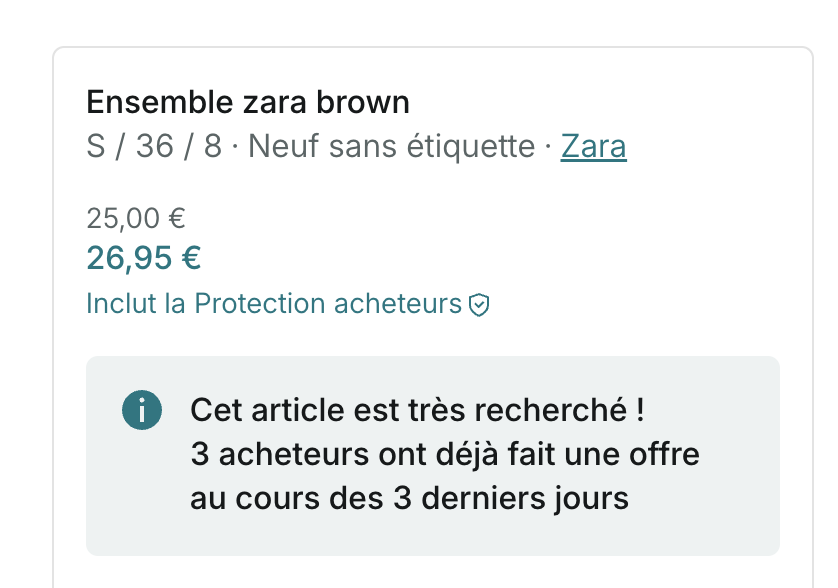

Has anyone seen the same thing?
Nothing from my end! Just the « on request » that appears correctly again. However, yesterday I saw a new feature on an ad. I took a screenshot

Did you see that on your end?
I haven’t seen either of the features.
The second one seems strange to me. You can’t schedule a sale. Vinted selects items to organize private sales?