I’m reaching out to ask for your help because I’ve been encountering a technical issue with re-publications since yesterday.
I’ve modified several photos in my listings, done a smart dressing, and also saved all my listings. I made the photo edits from my phone, and they synced well to my PC. However, when I re-publish, it’s my old photos that are re-published. Frankly, I really don’t understand why. I modified about thirty listings yesterday, and when I re-published, I thought I had forgotten to do something. But today I started again, modifying photos for 34 listings, and once again, none of them display my new photos.
If anyone has a solution, because I have 74 listings to modify (photos only), and if this happens every time, it will be really tedious.
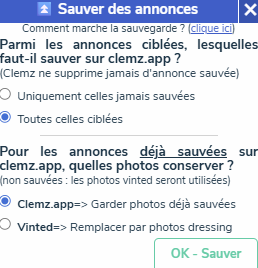
I think you haven’t selected the correct box. Look at the second part, I think you need to select Vinted=Replace with dressing photos, so that the save correctly takes your new photos.
Yes @kahlan is right: you must select « all targeted ones » then « Replace with dressing photos » when you make this change from your Vinted dressing. Clemz always starts from the clemz.app backup to republish/edit a photo.
If you choose « only those never saved », Clemz will « skip » those already on the backup.
Hello, thank you for your feedback, that’s exactly what I was doing but I didn’t pay any attention to it. I followed the advice given and it works perfectly, thank you very much.
 but I didn’t pay any attention to it. I followed the advice given and it works perfectly, thank you very much.