You may have noticed over the past few days… a new icon has appeared on your Clemz.app dashboard: the one for managing your sales.
You will be able to:
Track your sales from your Clemz dashboard, Analyze them in graphs (trends, best sales slots, sales by country, etc.), Print ALL your shipping slips in 1 print Print your slips in « thermal printer » format, Track your accounting, And for Professionals, create nice invoices.
This new module is available in beta testing, and other new features will be added in the coming weeks… but you already have a first preview.
We hope these new tools will save you even more precious hours!
Good evening, great news! Quick question: is there any risk to our Vinted account? I’ve heard about extensions that connect to accounts to extract data and have caused bans. Could this cause problems here?
Thank you for this feedback!
Clemz does not connect to your dressing room autonomously; this is done through the use of your personal device. This way, there are no suspicious IPs linked to Clemz.
one can always improve, but it’s already a great addition.
I was lucky enough to be able to test it since last month (and I thank you again for it) and it has become indispensable for me.
It’s simply GREAT, it’s the only thing Clemz was missing and that, I must admit, I was eyeing on others.. But my choice is confirmed, I LOVE Clemz it is now complete, with useful information, like average sales by day of the week, sales by country, etc. Great for better targeting customers and seeing what they like! And a perfect overview!
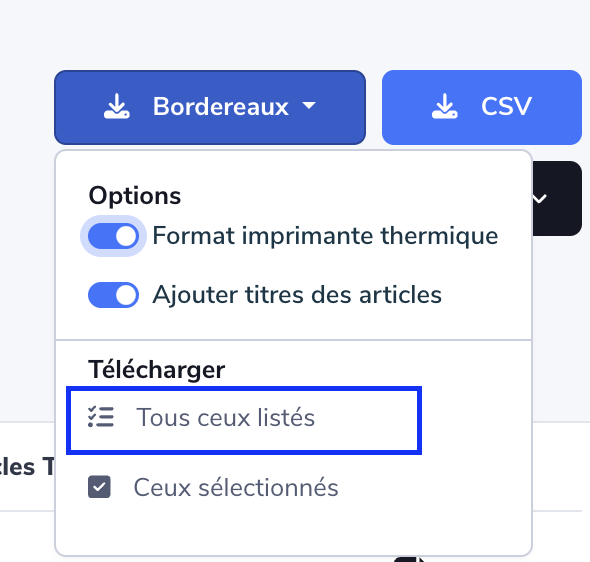
Just one question, I don’t see how to generate the slips in thermal printer format.. I see the option that can be checked and unchecked, but it doesn’t change the slip, even after refreshing.. Am I missing something?
Auto-reply: I am in the testing phase with the free version.
Yes, it is possible to generate invoices for past sales.
However, I do not know if the function is available on all plans and if, as a professional account, we must necessarily subscribe to the most expensive plan.
We do not have the item details on the slips for bulk sales. Is it planned in the future to display the title of each item directly on each slip? (similar to VintedCRM, for example)
Thank you
Hello,
I’ve created a « summary » mode that allows this without the risk of titles overflowing the slip. Because when you have a large batch and the titles are long, this often happens.
I’m open to an image presenting what VintedCRM does and that you like
Hello! What a joy this new module is, an angel fallen from the sky! Great work on your part, it really looks great!
I have a question, for example, I generated an invoice via clemz, the invoice amount is 31.40 euros including tax, whereas my sale brings me 31.93 euros (I think it’s because I’m a professional). So my invoice is not correct, is it?
Thanks in advance for the answer and above all, long live clemz
Hello, you are right, it overflows the slip when it’s too long.
I don’t have one on hand, but everything was displayed on one line, highlighted in yellow, and therefore the text was truncated at the end of the print area.
Practical when the item names are short.
The summary mode is frankly great. Even better if it could display the names of the items in orders with only 1 item: that would save us from juggling between the « summary » sheet and the slips.
Hello, at the bottom of each invoice, you have a line « Shipping costs ».
You need to add the VAT for shipping costs to the total amount (31.40) and you will get 31.93.
 Track your sales from your Clemz dashboard,
 Analyze them in graphs (trends, best sales slots, sales by country, etc.),
 Print ALL your shipping slips in 1 print
 Print your slips in « thermal printer » format,
 Track your accounting,
 And for Professionals, create nice invoices.





 I just saw, it’s too good. I’m going to cancel a subscription I had taken for this exact purpose
  thanks clemz

